
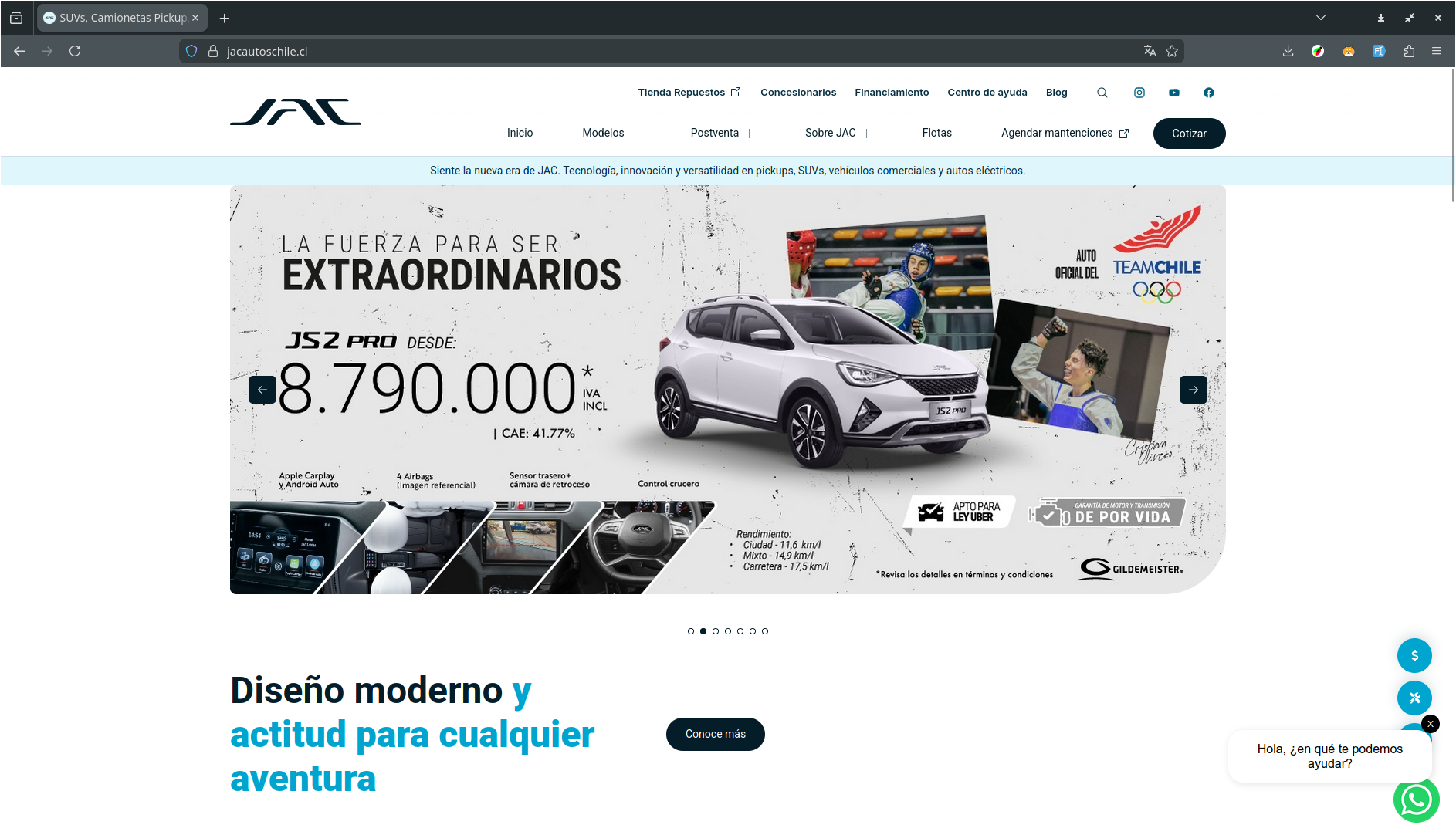
JAC Autos Chile: Automotive Website
JAC Autos Chile is a comprehensive automotive website built on top of WordPress with the Themosis framework, featuring car model comparisons, multi-step quote forms, fleet management, branch listings, and advanced filtering systems using Vue 3, Pinia state management, Laravel Mix, and modern frontend technologies.
Outline
- The project
- Key features
- The stack
- Frontend architecture
- Interactive components
- Conclusion
- Live website
The project
JAC Autos Chile is the official website for JAC Motors in Chile, showcasing SUVs, pickups, commercial vehicles, and electric vehicles. The website serves as the primary platform for vehicle exploration, quoting, dealership location, fleet management, and post-sale services.
The frontend development required implementing complex interactive features including car model comparisons, multi-step quote forms with model and version selection, advanced filtering systems, fleet management interfaces, and comprehensive content management.
Key features
The website includes several sophisticated features:
- Car Model Comparator: Side-by-side comparison of multiple vehicle models with difference highlighting
- Multi-step Quote Form: Comprehensive quote form with model selection, version selection, and customer information
- Advanced Filtering: Multi-criteria filtering for car models, branches, fleet vehicles, and blog posts
- Fleet Management: Dedicated fleet vehicle selection and management interface
- Branch Locator: Filterable dealership/branch listings with location information
- Blog System: Complete blog with filtering, search, and content management
- Manuals Listing: User manual and documentation management
- Search Functionality: Site-wide search with categorized results
- Sticky Navigation: Section-based sticky navigation for long pages
- 360° View: Interactive 360-degree vehicle viewing
The stack
The frontend stack consists of:
- Vue 3.2.4: Modern reactive framework with Composition API
- Pinia 2.2.6: State management for Vue applications
- Laravel Mix 6.0: Asset compilation and bundling
- SCSS: Advanced styling with organized architecture
- Vee-Validate 4.14.6: Form validation with Yup schemas
- Axios 1.6.8: HTTP client for API requests
- Splide.js 4.1.4: Modern carousel and slider components
- @splidejs/vue-splide 0.6.12: Vue 3 wrapper for Splide
- Maska 3.0.3: Input masking for formatted inputs
- Vue-Select 4.0.0-beta.6: Custom select component
- Vue-Recaptcha 2.0.3: reCAPTCHA integration
- Headroom.js: Header behavior on scroll
- jQuery 3.7.1: DOM manipulation and legacy support
- SweetAlert2: Modern alert dialogs
- @fdograph/rut-utilities: Chilean RUT validation utilities
Frontend architecture
Vue components
The application features a comprehensive set of Vue 3 components (40+ components):
Car Model Components:
Car.vue: Car model card component with comparison functionalityCarLoading.vue: Loading skeleton for car cardsCarVersion.vue: Car version/trim level componentCarVersionLoading.vue: Loading skeleton for version cardsCarModelsListingStatic.vue: Static car models listingCarModelsListingQuote.vue: Car models listing for quote flowCarVersionsListingQuote.vue: Versions listing for quote flowCarQuote.vue: Car quote display componentCarQuoteLoading.vue: Loading skeleton for quote cards
Comparison Components:
Comparator.vue: Main car comparison component with Splide integrationComparatorModal.vue: Modal version of comparatorCardCompareModel.vue: Comparison card for individual modelsCardCompareModelLoading.vue: Loading skeleton for comparison cards
Quote Components:
Quote.vue: Main quote component with multi-step flowQuoteForm.vue: Comprehensive quote form with validation
Filtering Components:
Filters.vue: General filtering componentFleetFilter.vue: Fleet-specific filteringBranchesFilter.vue: Branch/dealership filteringBlogFilter.vue: Blog post filteringAjaxListWithFilter.vue: AJAX-powered list with filtering
Content Components:
Blog.vue: Blog post card componentBlogLoading.vue: Loading skeleton for blog cardsFleet.vue: Fleet vehicle card componentBranch.vue: Branch/dealership card componentBranchLoading.vue: Loading skeleton for branch cardsManual.vue: Manual/documentation card componentManualLoading.vue: Loading skeleton for manual cardsManualsListing.vue: Manuals listing component
Form Components:
ContactForm.vue: Contact form with validationSelect.vue: Custom select dropdown component
UI Components:
Pagination.vue: Pagination componentStickySectionSelector.vue: Sticky navigation for sectionsEmptyState.vue: Empty state displaysLoader.vue: Loading indicatorErrorBoundary.vue: Error boundary componentSearchResults.vue: Search results displaySearchResultCard.vue&SearchResultCardLoading.vue: Search result cards
Service Components:
CardMaintenance.vue: Maintenance service cardCardMaintenanceLoading.vue: Loading skeleton for maintenance cards
JavaScript components
The application includes 12 specialized JavaScript components:
UI Components:
header.js: Header functionality and navigationheadroom.js: Header hide/show on scrollmegamenu.js: Mega menu functionalitysearch-modal.js: Search modal functionalityscrollUpBottom.js: Scroll to top/bottom functionalitysocial-share.js: Social media sharing
Media Components:
video.js: Video player setupsplide.js: Carousel initializationslick.js: Legacy carousel support
Interactive Components:
accordion.js: Accordion interactionstabs.js: Tab functionality
Utilities:
img-to-svg.js: SVG image conversion utilityscrollTrigger.js: Scroll-based animations
SCSS architecture
The styling follows a well-organized SCSS architecture:
scss/
├── abstracts/          # Variables, mixins, functions
│   ├── _mixins.scss
│   ├── _mq.scss       # Media query mixins
│   └── _vendor.scss
├── base/              # Base styles and typography
│   ├── _typography.scss
│   ├── _colors.scss
│   ├── _container.scss
│   └── _globals.scss
└── components/        # Component-specific styles
    ├── [87 component files]
    └── cards/         # Card component styles
        └── [20 card-specific files]
Key SCSS features:
- BEM methodology: Consistent naming convention throughout
- Media query mixins: Using
sass-mqfor responsive design - Modular architecture: 106 component-specific SCSS files
- Card organization: Dedicated card component styles
Interactive components
Car model comparator
The Comparator.vue component provides sophisticated car model comparison:
Features:
- Side-by-side comparison: Compare up to 3 models simultaneously
- Difference highlighting: Toggle to highlight differences between models
- Splide integration: Smooth carousel navigation for multiple models
- Dynamic data loading: Load comparison data via AJAX
- Responsive design: Optimized for mobile and desktop
- Modal version: Full-screen modal comparison view
Technical Implementation:
- Pinia store for comparison state management
- Splide Vue component for carousel functionality
- Dynamic component rendering based on selected models
- Efficient data structure for comparison attributes
Multi-step quote form
The Quote.vue and QuoteForm.vue components implement a comprehensive quote system:
Features:
- Step-by-step flow: Model selection → Version selection → Customer information
- Form validation: Using Vee-Validate with Yup schemas
- RUT validation: Chilean RUT validation using custom directive
- Input masking: Phone numbers and formatted inputs with Maska
- reCAPTCHA integration: Spam protection
- Edit functionality: Ability to go back and edit previous steps
- Selected vehicle display: Visual representation of selected model/version
- Loading states: Visual feedback during form submission
Form steps include:
- Step 1: Category and model selection
- Step 2: Version/trim level selection
- Step 3: Customer information and submission
Advanced filtering systems
Multiple filtering components provide comprehensive filtering:
Fleet Filter (FleetFilter.vue):
- Filter fleet vehicles by category, price range, and features
- Real-time filtering with URL parameter synchronization
- Mobile-optimized interface
Branches Filter (BranchesFilter.vue):
- Filter dealerships by location, region, and services
- Map integration support
- Contact information display
Blog Filter (BlogFilter.vue):
- Filter blog posts by category, date, and tags
- Search functionality
- Pagination support
Ajax List with Filter (AjaxListWithFilter.vue):
- Generic AJAX-powered list component
- Multiple filter criteria
- Loading states and empty states
Sticky section selector
The StickySectionSelector.vue component provides section-based navigation:
Features:
- Sticky positioning: Stays visible while scrolling
- Active section highlighting: Highlights current section
- Smooth scrolling: Smooth scroll to sections
- Responsive design: Mobile-optimized display
State management with Pinia
The application uses Pinia for centralized state management:
Stores:
- Comparator Store: Manages comparison state, selected models, and comparison data
- Quote Store: Manages quote flow state, selected model/version, and form data
- Filter Stores: Manage filter states for different content types
Benefits:
- Centralized state management
- Type-safe state access
- Efficient reactivity
- Easy debugging with Vue DevTools
Custom directives
The application includes custom Vue directives:
RUT Directive (input-rut):
- Chilean RUT (tax ID) validation and formatting
- Real-time validation as user types
- Format enforcement (XX.XXX.XXX-X)
Development workflow
The project uses Laravel Mix for asset compilation:
// Development
npm run dev          // Compile assets
npm run watch        // Watch for changes
npm run hot          // Hot module replacement

// Production
npm run production   // Optimized production build
BrowserSync integration provides:
- Live reloading during development
- Synchronized browser testing
- Proxy configuration for WordPress development
Performance optimizations
- Code splitting: Laravel Mix extracts vendor libraries
- Asset versioning: Automatic cache busting
- Image optimization: Lazy loading and responsive images
- Minification: Production builds are minified and optimized
- Tree shaking: Unused code elimination in production
- Component lazy loading: Load components on demand
- Skeleton loading: Better perceived performance with loading states
Accessibility
- Semantic HTML structure
- ARIA labels for interactive elements
- Keyboard navigation support
- Focus management in forms and modals
- Screen reader considerations
- Proper alt text for images
- Color contrast compliance
Conclusion and final thoughts
Building the JAC Autos Chile frontend was an excellent opportunity to:
- Master Vue 3: Working with Composition API, Pinia state management, and modern Vue patterns
- Build complex comparisons: Creating sophisticated car model comparison interfaces
- Implement multi-step forms: Complex quote forms with validation, RUT formatting, and step navigation
- Create advanced filtering: Multiple filtering systems for different content types
- Optimize performance: Implementing efficient state management, lazy loading, and code splitting
- Handle automotive data: Managing complex vehicle data structures and relationships
The project demonstrates proficiency in:
- Modern JavaScript frameworks (Vue 3)
- State management (Pinia)
- Form validation and user experience (Vee-Validate, Yup, Maska)
- Build tools and asset compilation (Laravel Mix, Webpack)
- CSS architecture and methodologies (SCSS, BEM)
- Component-based development
- Custom directives
- Carousel and slider implementations (Splide)
- AJAX-powered interfaces
The integration with WordPress/Themosis backend required careful consideration of server-side rendering, API endpoints, and content management workflows, making this a full-stack frontend implementation for a comprehensive automotive platform.
Live website:
Figma Prototype:

My name is
Luis G. Villegas
You May Also Like

ISC Chile: Educational Consultancy Website
ISC Chile is an educational consultancy website for study abroad …
ManyLMS: E-Learning platform
ManyLMS is an e-learning platform built on top of Strapi, React Router …

ETMday: Entrepreneurship Event Website
ETMday (Emprende tu Mente) is a large-scale entrepreneurship event …